
Download
Checkout
License
Overview
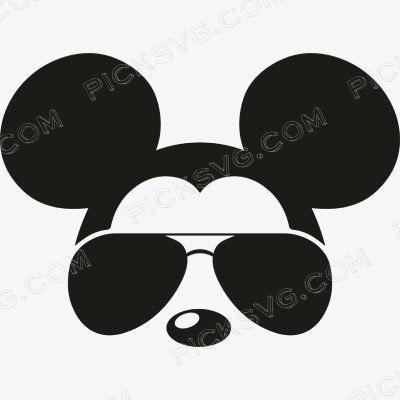
Mickey Mouse Aviator Sunglasses SVG – Cool Disney Fan Cut File for Cricut & Silhouette
Mickey Mouse Aviator Sunglasses SVG puts a cool, summer-casual spin on the world’s most beloved cartoon mouse by adding aviator sunglasses to the iconic round-eared silhouette – a playful character variant that trades the classic innocent expression for a cool-cat attitude that resonates strongly with adult Disney fans who want theme park and Disney-inspired merchandise that feels more stylish than juvenile. This specific character interpretation – adding cool sunglasses to an iconic cartoon figure – has become a well-established design tradition in Disney fan merchandise precisely because it ages the beloved character into adult lifestyle contexts without losing the instant recognition that makes Disney fan merchandise so commercially powerful.
This aviator-sunglasses treatment makes the design particularly well-suited for beach vacation, summer travel, and Disney resort merchandise where the laid-back cool character energy matches the relaxed, fun atmosphere of theme park and summer vacation experiences. Cut it in bold black HTV for a sleek Disney fan apparel piece that works at the parks and at home as casual lifestyle wear, or use the transparent PNG to sublimate a resort-style tumbler that travels with a Disney fan from pre-trip planning through post-vacation fond memory. Disney fan merchandise represents one of the largest and most consistently enthusiastic craft marketplace buyer communities, with demand driven by theme park visits, Disney-themed birthday parties, Disney Cruise sailings, and the general Disney lifestyle identity that millions of dedicated fans maintain year-round.
For Etsy sellers, aviator-sunglasses and cool-attitude Disney character variants serve the adult Disney fan segment who want parks-ready merchandise that reflects their personality as much as their fandom, supporting higher price points than children’s character merchandise within the same theme park preparation buying context.
Mickey Mouse Aviator Sunglasses SVG – Machine Compatibility & Cutting Notes
The round-ear silhouette and aviator lens detail cut cleanly on a Cricut Maker 3, where the precision blade preserves the sunglasses’ lens shape and frame detail at any standard Disney apparel or accessory size. For standard Disney fan apparel production, a Cricut Explore Air 2 handles this design reliably at sizes from 3 inches to full shirt graphics. Silhouette users on a Silhouette Cameo 4 can load the SVG directly for clean cutting suited to both theme park trip preparation merchandise and year-round Disney lifestyle apparel.
For sublimation Disney resort tumbler and vacation accessory production, the transparent PNG renders the cool sunglasses character detail sharply on light-colored drinkware and accessory substrates.
Included File Formats
Your ZIP download includes 5 formats: SVG for cutting machines, PNG with transparent background for sublimation and PLT printing, EPS for Adobe Illustrator, CorelDraw and Inkscape, DXF for CNC and Silhouette users, and PDF for reference on any device.
Project Ideas for Mickey Mouse Aviator Sunglasses SVG
Disney parks trip apparel cut in bold black serves adult fans who want cool, stylish character merchandise for their theme park experience. Resort-style tumblers sublimated with this design travel from pre-trip excitement through parks visits and post-vacation daily use. Summer and beach vacation Disney merchandise uses this cool sunglasses character for the relaxed lifestyle context. Pair with companion cool-attitude Disney character designs for a complete stylish adult Disney fan merchandise collection.
More Disney & Cartoon Character Designs
Browse more cartoon character and Disney fan cut files in the Cartoon Characters SVG collection. Need a custom character variant or different Disney inspired design? Our Custom Vector Design service can create it. For any questions, contact our support team anytime.
This is an instant digital download – no physical item is shipped. Commercial license included for Etsy and small business use.
Formats & machine compatibility
| Format | Best for | Opens in |
|---|---|---|
| SVG | Cutting vinyl, HTV, cardstock | Cricut Design Space, Silhouette Designer Edition |
| PNG | Sublimation, print-then-cut | Any printer software · 300 DPI, transparent |
| DXF | Silhouette Basic, CNC routing | Silhouette Studio Basic, Fusion, VCarve |
| EPS | Editing, recolouring, resizing | Illustrator, Inkscape, CorelDRAW, Affinity |
| Reference, proofing, print | Any PDF reader or print shop |
- Cricut Maker 3, Maker, Explore, Joy
- Silhouette Cameo 4 & 5, Portrait — use DXF on Basic edition
- Brother ScanNCut SDX & DX
- Laser Glowforge, xTool, diode lasers
How to use these files
STEP 1
Unzip on a computer
Design Space needs unzipped files, so extract the ZIP on a desktop or laptop rather than a phone.
STEP 2
Upload the right format
In Design Space: Upload → Upload Image → select the SVG. On Silhouette Basic, import the DXF instead.
STEP 3
Size, then cut
Size to your blank before cutting. For sublimation, skip the SVG and print the PNG at 300 DPI.
Full walkthrough with screenshots: how to upload an SVG to Cricut Design Space.
License summary
- Personal projects — unlimited
- Sell finished physical items: shirts, tumblers, decals, signs
- Sell on Etsy, at markets, or in your own shop
- Resell, share or redistribute the digital files
- Print-on-demand services without written permission
Reviews
Only logged in customers who have purchased this product may leave a review.
You May Also Like





Reviews
There are no reviews yet.